
Overview of EU Intra-Community Distance Selling in Odoo 18 Accounting
Cross‑border distance selling within the European Union has evolved significantly over the past decade. For global retailers, manufacturers, and software-enabled service providers, the combination of OSS (One‑Stop Shop), IOSS (Import One‑Stop Shop), and modern ERP tooling means you can manage complex VAT rules more efficiently than ever. This article provides a practical, ERP‑focused guide to understanding and configuring EU intra‑Community distance selling in Odoo 18 Accounting. You’ll learn how to determine the correct VAT jurisdiction, configure OSS and IOSS workflows, and adapt tax rules for each EU member state while keeping governance tight and auditable.
The content targets senior business leaders, CTOs, CFOs, and IT decision-makers at global mid‑size to large organizations who want to align their Odoo 18 deployment with EU VAT requirements and digital reporting obligations. It blends policy context, practical configuration steps, and real‑world examples to help you plan, implement, and govern intra‑EU distance selling with confidence.
Section overview at a glance
| Topic | Key takeaway |
|---|---|
| Understanding intra‑EU distance selling | OSS/IOSS concepts, B2C vs B2B VAT treatment, thresholds, and cross‑border VAT basics |
| Odoo 18 setup for intra‑EU selling | Tax structure, fiscal positions, VIES validation, OSS registration, product/customer mapping |
| Member‑state specifics | Country‑level VAT nuances and how to model them in Odoo with central policies |
| Implementation and governance | Data quality, testing, reconciliation, and ongoing updates to tax rules |
| Next steps | How Encode IO can help with migration, optimization, and ongoing VAT governance |
Introduction
EU intra‑Community distance selling refers to cross‑border sales from a seller in one EU member state to consumers or businesses in another EU member state where the goods are dispatched from the seller’s country. The EU introduced OSS and IOSS to simplify VAT reporting and compliance for distance selling, while also ensuring VAT is correctly accounted for as goods move across borders. With Odoo 18 Accounting, you can map the tax flows to your sales, shipping, and invoicing processes, automate VAT calculations, validate customer VAT numbers, and generate the OSS and IOSS returns that EU tax authorities require.
This article is structured to give you a practical, end‑to‑end view: why OSS/IOSS matter for your business, how to configure Odoo 18 for intra‑EU distance selling, how to handle country‑specific tax rules, and what a pragmatic implementation checklist looks like for real‑world deployments. You’ll also find short case studies and a clear CTA to engage Encode IO for setup, governance, and ongoing optimization.
1. Understanding EU Intra-Community Distance Selling
Intra‑EU distance selling is defined by cross‑border sales where the seller uses EU dispatch centers or warehouses in one member state and ships to customers in another member state. The critical policy shifts in recent years center on OSS for B2C sales inside the EU and IOSS for goods imported into the EU by non‑EU sellers or from distance selling channels.
Key concepts to keep in mind:
- OSS (One‑Stop Shop): A VAT return mechanism that allows a seller to declare and pay VAT due on cross‑border B2C distance sales within a single OSS return, filed in the seller’s member state. OSS covers intra‑EU B2C transactions within the EU. It replaces the need for multiple VAT registrations for each destination country for these sales, simplifying compliance for digital services and goods direct to consumers (where the place of taxation is often the destination country).
- IOSS (Import One‑Stop Shop): A system for goods imported into the EU under distance selling thresholds. IOSS simplifies VAT collection at import for B2C orders with goods valued up to the threshold, allowing VAT to be collected at the point of sale and reported centrally via IOSS returns.
- Distance selling thresholds: Each member state previously had its own threshold for assignment of VAT in cross‑border B2C sales. The OSS regime standardizes reporting but country thresholds and VAT rates still apply to destinations for rate calculation and invoicing.
- B2C vs B2B VAT treatment: B2C cross‑border distance selling often triggers VAT in the destination country via OSS/IOSS; B2B sales can be zero‑rated or fall under reverse charge rules, depending on the partner’s VAT status and the product category.
Practical implications for ERP and Odoo 18:
- When to apply domestic VAT versus cross‑border VAT depends on customer type (B2B/B2C), product type, and destination country.
- Accurate VAT registration status and validation (including VIES checks) is critical for compliance and accurate invoicing.
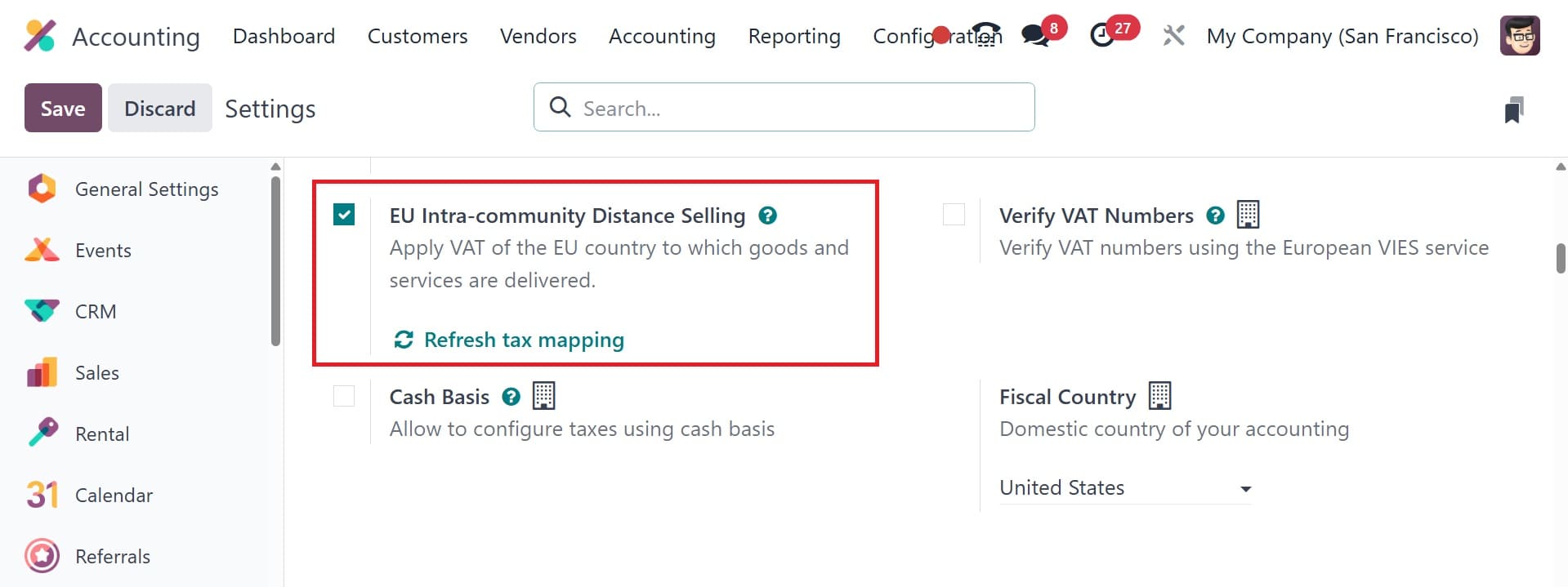
- In Odoo 18, you configure tax mappings, fiscal positions, OSS/IOSS handling, and reporting templates to reflect the EU’s distance selling regime.
2. Setting Up Odoo 18 for EU Intra-Community Distance Selling
Setting up Odoo 18 for intra‑EU distance selling requires a structured approach that aligns with the EU VAT directive and the OSS/IOSS reporting requirements. Below is a concise blueprint you can apply, followed by a more granular step‑by‑step checklist.
High‑level setup steps
| Area | What to configure |
|---|---|
| Tax structure | Define country VAT rates and create country‑specific tax codes; establish a central VAT policy with country exceptions. |
| Fiscal positions | Set up EU‑to‑EU, EU‑to‑domestic, and domestic mappings to determine VAT during invoicing and reporting. |
| VIES validation | Enable VIES validation for EU customer tax IDs to confirm validity before invoicing or OSS processing. |
| OSS/IOSS tracking | Configure OSS and IOSS dashboards and reporting templates; map to corresponding VAT returns. |
| Product tax mapping | Link products to tax categories by country or region to ensure correct VAT on line items. |
| Invoicing rules | Define cross‑border B2C and B2B invoicing rules; ensure correct VAT breakdown and destination codes on invoices. |
Step‑by‑step configuration (high‑impact bullets)
- Create and map tax codes per EU country (e.g., FR‑VAT, DE‑VAT, IT‑VAT). Ensure each code includes the standard VAT rate and any reduced rates applicable to your products.
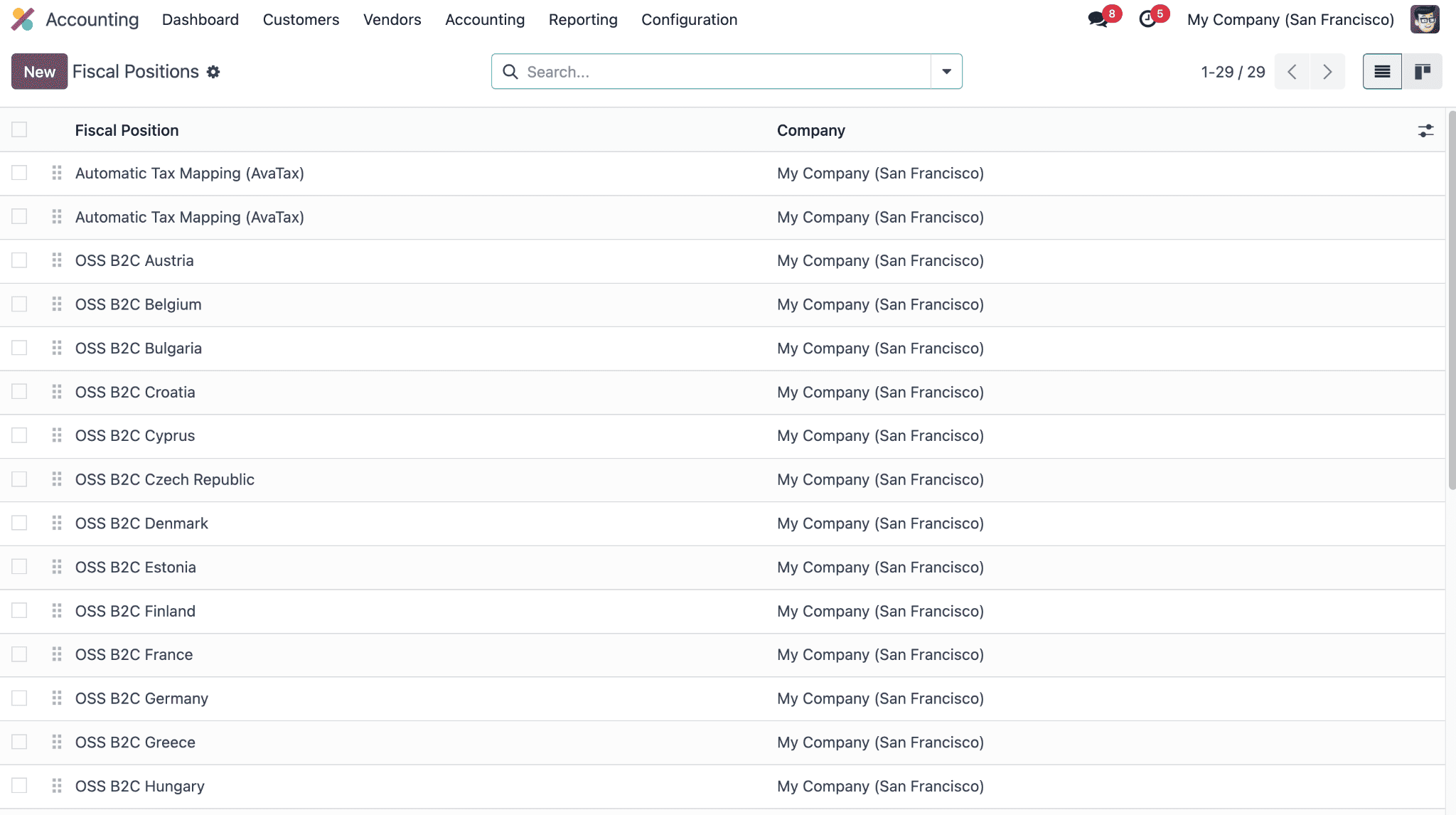
- Define fiscal positions: EU to EU, EU to domestic, and domestic to EU; associate every partner and product with the appropriate fiscal position to drive correct VAT on invoices.
- Enable OSS reporting in the Taxes/Accounting module; configure the OSS core fields (OSS registration number, destination country, and period) and link to the VAT return workflow.
- Configure partner VAT numbers and implement a VIES validation workflow; store validation results and attach them to customer records for auditability.
- Set up automated VAT reporting templates for OSS returns and, where relevant, IOSS reporting; ensure the data captures cross‑border B2C volumes and import deliveries.
- Integrate with e‑commerce platforms and marketplaces (Shopware, Shopify, Magento, Amazon, etc.) to push orders into Odoo with correct tax context and customer data for OSS processing.
Critical checks before go‑live:
- Data quality: verify VAT numbers, customer country, and product tax categories; cleanse addresses and ensure consistent country codes.
- User roles and approvals: restrict OSS submissions to authorized finance and tax personnel; implement an approval workflow for VAT returns.
- Reconciliation: establish a process to reconcile OSS and IOSS reported amounts against orders, shipments, and invoices to catch mismatches early.
Simplify EU VAT compliance with Encode IO
Drop us a note and we’ll get back to you soon
3. Taxes and Fiscal Situations in Odoo 18 Accounting for Every EU Member State
The EU’s tax landscape is nuanced and country‑specific. The goal in Odoo 18 is to maintain a central, scalable tax policy while adapting to country rules where necessary. The framework below provides a practical approach and a starting point for country‑level configuration. Always cross‑check with official EU VAT guidance and your national tax authority for rate changes and threshold updates.
Approach
Adopt a repeatable method to handle country rules within a single Odoo instance. This means maintaining a master tax policy for common rules and layering on country‑specific VAT rates, validation rules, and OSS/IOSS handling as required by each jurisdiction.
Table: EU Member States — Tax considerations in Odoo 18
| Member State | Key VAT concept for distance selling | OSS applicability | IOSS applicability | Odoo configuration notes |
|---|---|---|---|---|
| France | Standard rate; distance selling to consumers typical OSS routing | Yes for B2C cross‑border sales | Limited to eligible imported goods; not usual for pure intra‑EU distance selling | Map FR VAT to standard rate; enable OSS for FR destination; VIES check on FR customers |
| Germany | Standard rate; cross‑border B2C typically OSS; B2B may use reverse charge | Yes | Context‑dependent | Enable EU‑to‑EU mappings; ensure client is EU B2C where OSS applies; verify DE VAT rules |
| Italy | Reduced rates for certain goods; OSS coverage for B2C | Yes | Generally yes for imports via IOSS for eligible goods | Include IT VAT code with accurate reductions; keep OSS period aligned with Italian returns |
| Spain | Standard and reduced rates; OSS used for B2C cross‑border | Yes | Depends on import scenario; typical intra‑EU use of OSS | Configure country‑specific rates and B2C routing to ES via OSS |
| Netherlands | Standard VAT with possible reduced rates; OSS for cross‑border B2C | Yes | Functional under import scenarios | Maintain detailed country rate mapping; ensure OSS reports capture ES and NL cross‑border flows |
| Poland | Poland VAT policies; cross‑border B2C buildings under OSS | Yes | Depends on import regime | Include PL VAT code; align with Poland’s invoicing rules |
| Sweden | Standard vs reduced rates; OSS routing for B2C cross‑border | Yes | Depends on product category and import rules | Set up country rate matrix and check OSS outputs for Sweden |
| Belgium | Complex VAT rules by product; OSS applicable for B2C exports | Yes | Import scenarios vary | Apply BE VAT group settings; ensure OSS returns reflect BE destinations |
| Austria | Standard rate; intra‑EU B2C via OSS | Yes | Depends on import regime | Maintain accurate A‑level tax mapping for AX products |
| Ireland | Intra‑EU B2C via OSS; imports can involve IOSS depending on scenario | Yes | Yes for eligible import scenarios | Keep IRE tax codes aligned with ECC rules; verify VAT numbers via VIES |
Notes: The above entries are illustrative and intended as a framework. VAT rates vary by product category and by policy updates from the EU and each member state. Always refer to the official EU VAT guidance and the respective national tax authorities for current rates, thresholds, and OSS/IOSS rules. In Odoo, maintain country‑specific tax groups, VAT codes, and country mappings, and use OSS/IOSS reporting templates to streamline filing.
Short case studies
- Example A: A B2C cross‑border sale to France above the OSS threshold ships from your EU warehouse. In Odoo, the system applies FR VAT via OSS, generates a destination‑coded invoice, and includes the OSS line item in the OSS return for the month.
- Example B: A B2B sale to Germany where the customer is VAT‑registered. The sale uses a reverse‑charge mechanism, with VAT accounted by the purchaser rather than the seller, and the invoice reflects the reverse‑charge rule in DE.
- Example C: A mixed basket to Spain with items subject to standard rate and a product explaining reduced rates. Odoo maps items to the correct country tax rates and consolidates them in the OSS submission while properly segregating B2B and B2C lines.
Ensure seamless EU distance selling compliance
Drop us a note and we’ll get back to you soon
4. Practical Implementation
Use this checklist to guide pre‑implementation, configuration, validation, and post‑live governance. Each item is paired with practical actions and ownership notes to keep the project under control.
Pre‑implementation
- Data audit: verify VAT IDs, customer addresses, product tax categories, and country codes.
- Stakeholders: Tax, Finance, IT, Compliance; define roles for OSS/IOSS processing and approvals.
- Baseline reporting: decide which OSS/IOSS templates you’ll use and the cadence of submissions.
Implementation steps
- Configure Odoo 18 tax structures and fiscal positions; build a master policy with country exceptions.
- Set up OSS/IOSS dashboards, mapping, and reporting templates; link to VAT returns.
- Enable VIES validation and store validation results on customer records for auditability.
- Set up product tax mappings that reflect country‑specific rates and applicability.
- Integrate with e‑commerce channels to push orders with accurate tax context into Odoo.
- Define and test cross‑border B2C and B2B invoicing rules; ensure correct tax breakdowns.
Validation & go‑live
- End‑to‑end testing with sample orders across EU destinations, including OSS returns and IOSS for imports where applicable.
- Reconciliation tests: assure OSS amounts reconcile to orders, shipments, and invoices; resolve mismatches before go‑live.
- User training: provide targeted training for tax and finance teams; create handbooks for OSS/IOSS processes.
Post‑live
- Periodic review of tax mappings and rates; subscribe to rate change alerts from EU sources.
- Continuous monitoring for VIES validation issues and OSS/IOSS errors; implement a<strong> structured ticketing</strong> process for remediation.
- Audit readiness: maintain logs, mappings, and decision records to support internal audits and external reporting.
Streamline EU VAT reporting with Encode
We simplify Odoo accounting to boost your business growth.